
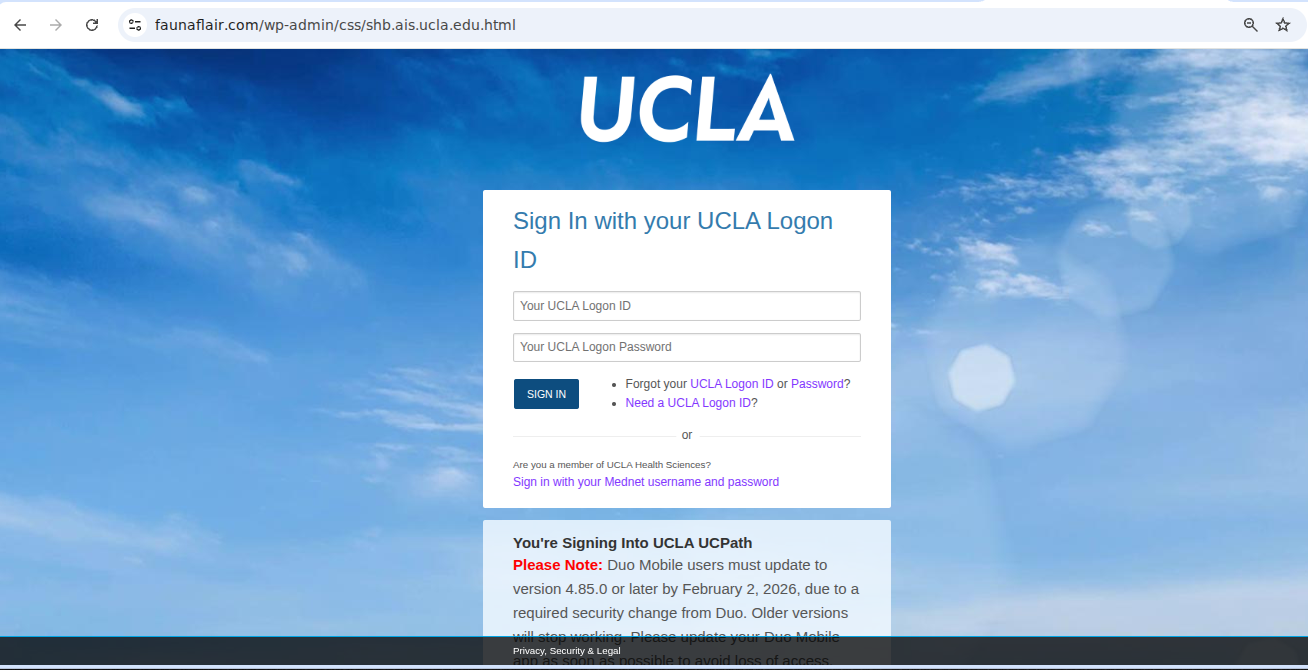
The UCLA Information Security Office is aware of a phishing email currently circulating that poses as UCPath and urges recipients to click a link. The link leads to a fraudulent website designed to closely mimic the UCLA Single Sign-On (SSO) login page in an attempt to steal user credentials.
Key details:
- The email claims to be related to UCPath actions or notifications.
- The embedded link redirects to a fake UCLA SSO login page.
- Any credentials entered on this page are sent to attackers.
What to do:
- Do not click links or open attachments from unexpected UCPath-related emails.
- Always check the sender's email address.
- Always review the URL when entering login credentials.
- If you clicked the link or entered credentials, change your password immediately and report the incident to security@ucla.edu.
- Report suspected phishing emails to security@ucla.edu
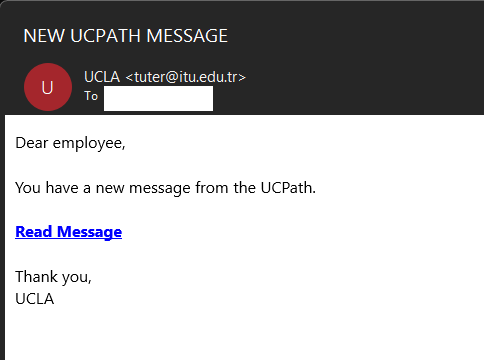
Subject: NEW UCPATH MESSAGE
Body:
Dear employee,
You have a new message from the UCPath.
Read Message <Links redirects to page impersonating UCLA SSO>
Thank you,
UCLA
Below is the webpage impersonating UCLA Single Sign on. A quick review of the page's link will show it is fraudulent.
Report Scams
If you receive a suspicious email, do not click on any links, open any attachments, send payment, or supply any credentials. Please do not reply to the email and immediately contact security[@]ucla.edu and report it to your IT team.